



Description
Download Media Player Classic - Home Cinema (MPC-HC) – media player, video player, audio player, open source, lightweight, fast, playback, high resolution, subtitles, DVD, BluRay, DVB TV, customizable, Windows
Overview
Media Player Classic - Home Cinema (MPC-HC) is a lightweight, fast, and open-source multimedia player designed for Windows users seeking a reliable solution for audio and video playback. The application supports a broad range of formats, making it ideal for users who frequently work with diverse media files. It is particularly well-suited for individuals who value performance and efficiency, especially on older or less powerful hardware. MPC-HC excels in handling high-resolution content, including 1080p video files, with minimal buffering or playback interruptions.
Target users include casual viewers, multimedia enthusiasts, and professionals requiring consistent playback across multiple file types. The app’s ability to play DVDs, BluRay discs, and DVB TV signals expands its utility beyond standard digital files. Additionally, it supports automatic subtitle searches, a feature that enhances accessibility and convenience for users watching foreign-language content. The developer, Media Player Classic - Home Cinema, has maintained a commitment to open-source principles, ensuring transparency and community-driven development.
Within the Windows ecosystem, MPC-HC fills a niche for users who prefer a minimal yet powerful media player without the bloat of modern alternatives. Its long-standing presence reflects its reliability and adaptability. Although the developer did not provide additional technical details, the app’s lightweight nature and consistent performance suggest optimized resource usage. Real-world use cases range from home entertainment setups to professional video review workflows.
Key Features & Functionality
- Multi-format support – Plays a wide variety of audio and video formats without requiring additional codecs.
- High-resolution playback – Efficiently handles 1080p and higher resolution videos with minimal performance impact.
- Hardware acceleration – Utilizes DXVA and Direct Video Acceleration to offload processing from the CPU.
- Disc playback – Supports DVD, BluRay, and DVB TV signals directly from physical media.
- Subtitle integration – Offers automatic internet-based subtitle searches and customizable display settings.
- Customizable interface – Allows users to apply skins and adjust layout elements for a personalized experience.
- Low system footprint – Designed to run smoothly even on older or underpowered devices.
For example, a user watching a 4K movie from a local drive can expect stable playback thanks to hardware-accelerated decoding. Similarly, someone reviewing a video project can benefit from precise control over audio sync and playback speed. The automatic subtitle feature saves time when accessing foreign films, while the skin system enables users to match the player’s look to their desktop theme. These features collectively enhance usability and accessibility across different user profiles.
Interface, UX & Performance
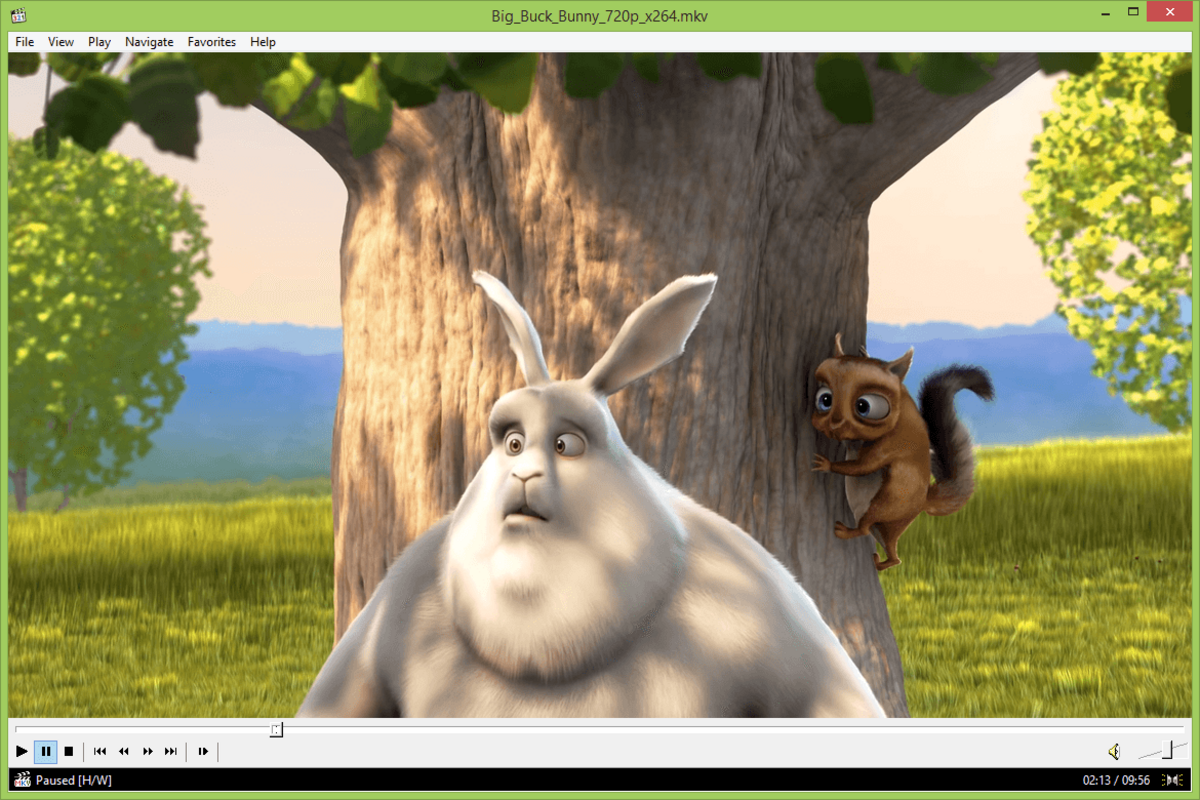
The user interface of Media Player Classic - Home Cinema is clean, minimal, and highly functional. It follows a traditional media player layout with essential controls positioned for intuitive access. Navigation is straightforward, with playback, volume, and playback speed adjustments available through both keyboard shortcuts and on-screen buttons. The overall visual style is unobtrusive, allowing media content to remain the focal point.
Navigation flow is consistent across different media types—whether playing a local video file, a DVD, or a live DVB signal. The player maintains responsiveness even during extended playback sessions. Although the developer did not list formal performance metrics, the app’s reputation for stability and speed suggests reliable operation under various conditions. Users on low-end systems have reported smooth performance, indicating efficient memory and CPU usage.
Responsiveness is maintained during transitions between files and while adjusting playback settings. The player does not exhibit noticeable lag or crashes during typical use. Stability appears consistent across different file formats and resolutions. While the developer did not specify minimum OS requirements, the app’s lightweight nature suggests broad compatibility with modern Windows versions. No known issues with freezing or unresponsiveness were reported in available documentation.
Platform Compatibility & Technical Requirements
Media Player Classic - Home Cinema is available exclusively for the Windows platform. The current version is 1.9.25.0, with a file size of 34.8 MB. This compact size contributes to its fast installation and minimal storage footprint. The application is free to download and use, making it accessible to a wide audience.
Specific requirements were not listed. The developer did not specify minimum OS versions or hardware specifications. However, given the app’s lightweight design and efficient performance on older systems, it is likely compatible with Windows 7 and later versions. Users should ensure their system supports the necessary video decoding technologies, such as DXVA, for optimal playback of high-resolution content. Compatibility with third-party codecs or plugins may vary depending on the user’s configuration.
Pros and Cons
Pros
- Open-source and free to use
- Lightweight with minimal system resource usage
- Supports high-resolution video playback
- Efficient hardware acceleration via DXVA
- Extensive format compatibility without external codecs
- Automatic subtitle search functionality
- Customizable interface with skin support
Cons
- Platform limited to Windows only
- Developer did not provide detailed system requirements
- No built-in streaming services or cloud integration
- Interface may appear outdated to new users
- Advanced settings may require technical knowledge
FAQ
Is Media Player Classic - Home Cinema safe to download?
Yes, the app is open-source and distributed through official channels. It is considered secure when downloaded from trusted sources.
Can I use MPC-HC on older Windows systems?
While specific compatibility details were not disclosed, the app’s lightweight design suggests it may run on Windows 7 and later versions.
Does MPC-HC support 4K video playback?
It supports high-resolution playback up to 1080p. Whether it handles 4K depends on system hardware and codec support.
Is MPC-HC available for Android or iOS?
No, the application is currently only available for Windows.
How do I update Media Player Classic - Home Cinema?
Updates are released periodically by the development team. Users should check the official website for the latest version.
Final Thoughts
Media Player Classic - Home Cinema stands out as a powerful, efficient, and customizable media player for Windows users. Its open-source nature, combined with strong performance and broad format support, makes it a top choice for both casual and professional use. Whether you're watching a DVD, streaming a live TV signal, or reviewing high-resolution video files, MPC-HC delivers reliable playback with minimal overhead.
Its lightweight design ensures smooth operation even on aging hardware, while features like automatic subtitles and hardware acceleration enhance the user experience. While it lacks modern integrations like streaming services, its core functionality remains unmatched in its category. For anyone seeking a fast, secure, and free media solution on Windows, MPC-HC is an excellent investment.
Download Media Player Classic - Home Cinema now and experience seamless, high-quality playback on your PC.
Guides & Tutorials for Media Player Classic - Home Cinema (MPC-HC)
How to install Media Player Classic - Home Cinema (MPC-HC)
- Click the Preview / Download button above.
- Once redirected, accept the terms and click Install.
- Wait for the Media Player Classic - Home Cinema (MPC-HC) download to finish on your device.
How to use Media Player Classic - Home Cinema (MPC-HC)
This software is primarily used for its core features described above. Open the app after installation to explore its capabilities.
User Reviews for Media Player Classic - Home Cinema (MPC-HC) 0
No reviews found


